Performance review completion checklist
A review is not complete when the form is submitted.
Close the full performance loop.
Use this checklist to confirm submissions, complete manager conversations, release results correctly, record follow-through and prepare the next cycle without carrying unresolved work forward.
$6 per user/month · Standard onboarding included · No minimum seats
Close the cycle responsibly
Administrative completion and employee completion are not the same.
A system may show every form as submitted while employees still wait for a conversation, results remain unreleased or agreed actions have no owner. True completion covers the workflow and the human outcome.
Submission control
Resolve drafts, overdue reviews, exceptions and duplicate or incorrect assignments before closing the period.
Conversation confirmation
Make sure the manager and employee discussion occurred and unresolved questions have an owner.
Correct release
Release results according to the approved visibility and timing rules rather than assuming submission equals visibility.
Follow-through ownership
Record development, support or improvement actions with responsible people and a next checkpoint.
Product evidence
See the real workflows your people will use.
These are current EvalFlow product views—not conceptual mockups. Your demonstration is configured around your roles, review structure and operating reality.
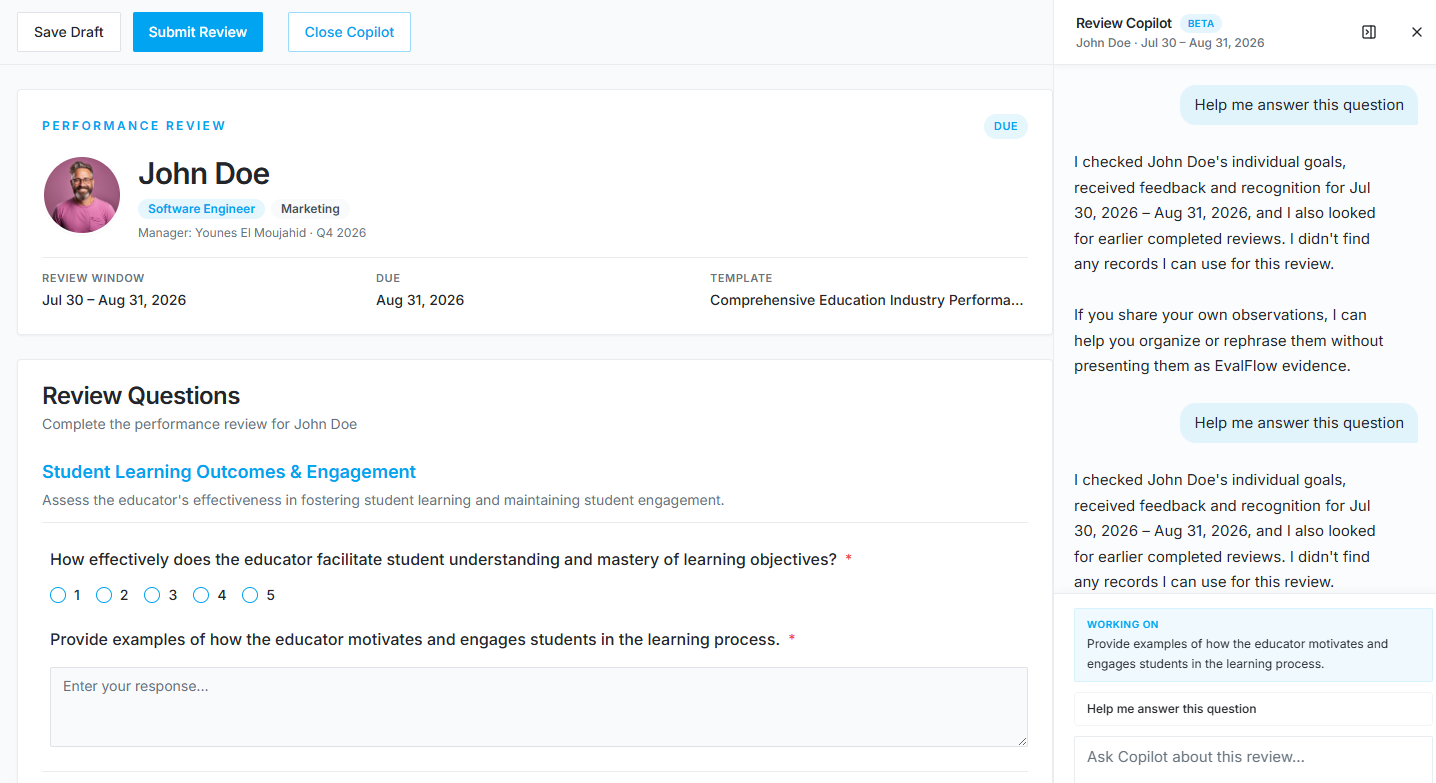
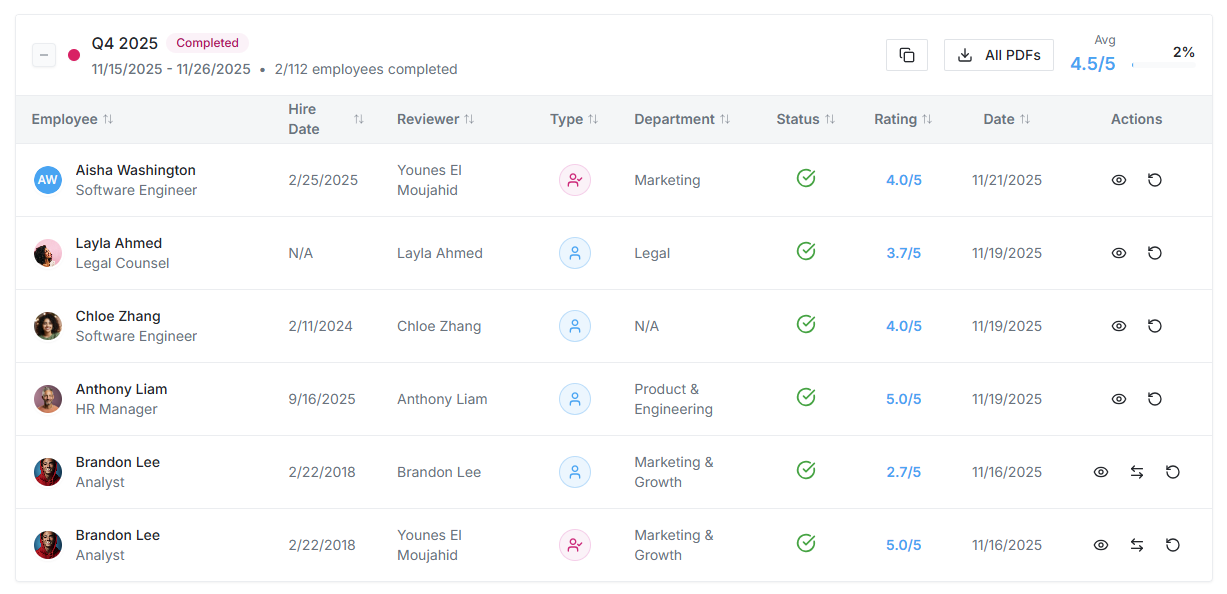
Real workflow
Complete the cycle in four controlled stages.
Every step has a clear owner, visibility rule and next action. People remain responsible for consequential judgments and submissions.
1
Reconcile assigned work
Confirm submitted, draft, overdue, exempt and reassigned reviews; resolve data or reporting-line errors before closure.
2
Confirm conversations
Ensure managers have discussed the review, invited employee context and escalated material disagreements appropriately.
3
Release and record
Apply the approved release rules, verify employee access and preserve the final review record and authorized exports.
4
Create follow-through
Assign development, support or improvement actions, schedule the next checkpoint and document lessons for the next cycle.
Completion must make sense to the employee
Employees should know the outcome and what happens next.
Employees need confirmation that the cycle is complete, access to the information they are authorized to see, a chance to contribute context, and clarity about development, support or next actions. A silent status change is not a completed performance experience.
Clear value for every role
One connected process. Different responsibilities.
For HR and process owners
Reconcile the population, manage exceptions, control release and record lessons for the next cycle.
For managers
Complete the conversation, answer questions and own agreed follow-through.
For employees
Review the outcome, add relevant context where the process permits and understand the next checkpoint.
Evaluate the operating fit
Use a closeout standard that goes beyond the dashboard percentage.
Completion rate is useful, but it does not confirm conversation quality, correct release or follow-through.
| Decision area | Typical standalone approach | EvalFlow approach |
|---|---|---|
| Cycle status | All forms show submitted | ✓Every assignment and approved exception is reconciled |
| Employee outcome | No further action after submission | ✓Conversation, visibility and next steps confirmed |
| Release control | Results appear automatically | ✓Release follows approved timing and permissions |
| Follow-through | Actions remain in conversation notes | ✓Owners and checkpoints are recorded |
| Next-cycle learning | The process restarts unchanged | ✓Issues and improvements are documented |
Implementation included
Your organization owns the process. EvalFlow carries the setup.
EvalFlow completes most initial configuration, validates the working setup with your designated process owners, trains administrators and managers on the approved workflow, and supports either an organization-wide or phased launch.
1
Align
Confirm the business purpose, owners, population, workflow, dates and visibility decisions.
2
Configure
EvalFlow prepares the initial users, structure, templates, permissions and workflow.
3
Validate
Process owners test the real setup by role and approve agreed corrections before release.
4
Prepare and launch
EvalFlow trains administrators and managers, supports communication and remains involved through launch.
Trust, connection and cost
Practical for users. Defensible for buyers.
Security by design
Tenant isolation is enforced at the PostgreSQL level with row-level security, authenticated access, role-based permissions, 2FA and server-side authorization.
Connected workforce data
Use supported HRIS connections, CSV or API planning to keep people, managers, departments and employment status aligned. Slack and Microsoft Teams connections support the workflow.
Predictable pricing
The standard plan is $6 per user/month or $5 per user/month billed annually. Confirm optional SSO/SAML and HRIS integration service scope during evaluation.
Frequently asked questions
What buyers and process owners ask.
When is a performance review cycle truly complete?
When assigned work and exceptions are reconciled, required conversations have occurred, results are released correctly, employees understand next steps and follow-through has an owner.
Should HR close a cycle with overdue reviews?
Only after each overdue item has an explicit decision such as completion, reassignment, approved exemption or documented escalation. Do not let unresolved work disappear inside a closed status.
Does submitting a review automatically make it visible to the employee?
Not necessarily. Visibility depends on the organization’s configured release process. Process owners should confirm the approved rule and test employee access.
What should happen after the review conversation?
Record agreed development, support or improvement actions, assign ownership and set the next checkpoint so the review informs ongoing performance work.
How does EvalFlow support cycle closeout?
EvalFlow helps process owners track the workflow and validates the initial configuration and release process. The customer remains responsible for policy decisions and final approvals.
Continue evaluating
Evidence for the rest of your decision.
Bring your real process.
We’ll show you the working fit.
Use your roles, timing, workflow and buying requirements. We will demonstrate the experience, explain implementation responsibilities and answer the hard questions directly.
No setup fee · No minimum seats · Monthly option available