Employee evaluation software
Employee evaluations people can understand—and HR can control.
Structured, visible and ready to run.
EvalFlow helps organizations replace disconnected evaluation forms with one configured process for self, manager, peer and 360-degree input, supported by clear permissions and connected performance context.
$6 per user/month · Standard onboarding included · No minimum seats
A complete evaluation workflow
Collecting answers is easy. Running a trustworthy process is harder.
The system must assign the right work, protect visibility, guide reviewers, track completion and preserve the final record. EvalFlow connects those responsibilities instead of leaving HR to reconcile them manually.
Flexible evaluation formats
Use self, manager, peer or multi-rater workflows based on the approved purpose and population.
Configurable evaluation content
Use role-relevant sections, questions, rating scales, competencies and weighting when the process requires them.
Connected evidence
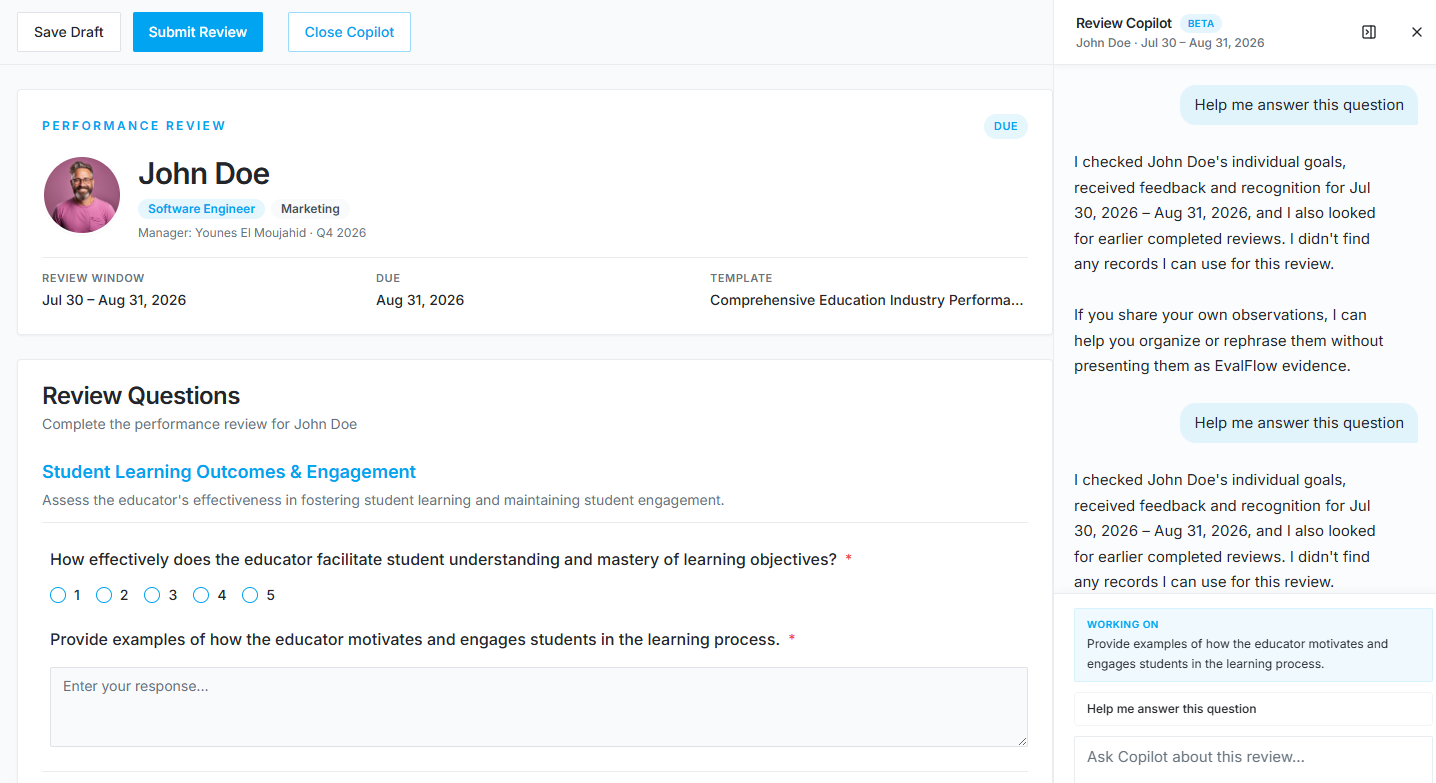
Bring authorized feedback, recognition, objectives and previous review context into preparation.
Clear workflow status
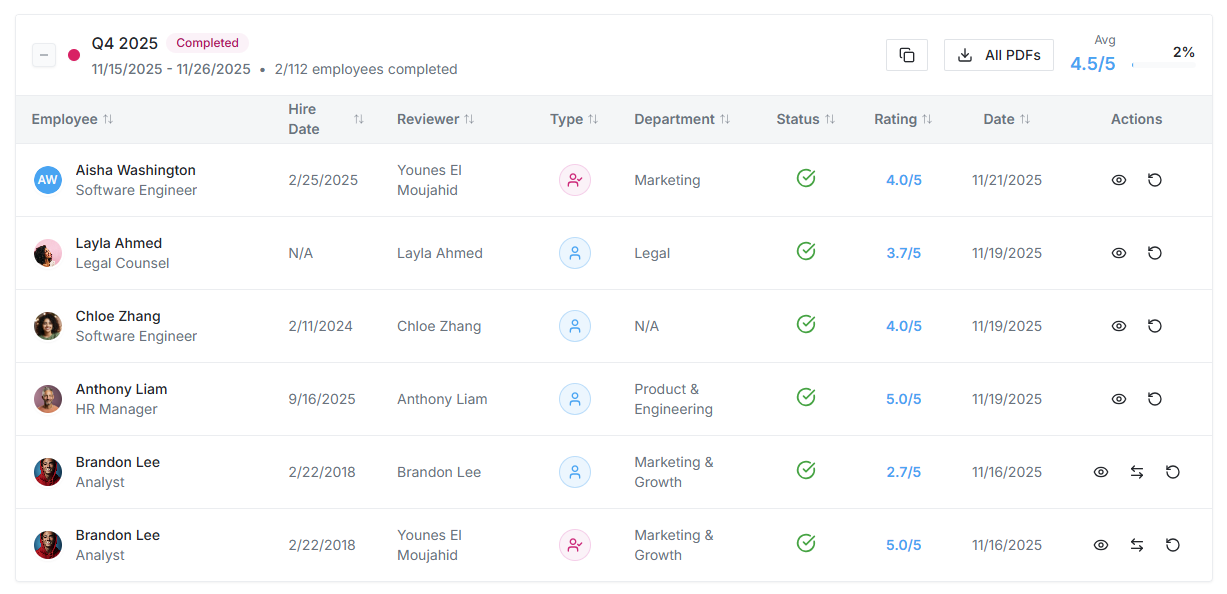
Give process owners visibility into assigned, in-progress and completed work without a separate tracker.
Product evidence
See the real workflows your people will use.
These are current EvalFlow product views—not conceptual mockups. Your demonstration is configured around your roles, review structure and operating reality.
Real workflow
One evaluation process from assignment to follow-through.
Every step has a clear owner, visibility rule and next action. People remain responsible for consequential judgments and submissions.
1
Define the evaluation
Confirm the business purpose, population, reviewers, questions, rating method, dates and release rules.
2
Prepare assignments
EvalFlow configures participants, templates, permissions and workflow for process-owner review.
3
Complete with context
Employees and managers complete their assigned work with clear visibility and authorized evidence.
4
Release and follow through
Apply the approved release process and carry development or support priorities into future conversations.
A two-way performance process
Employees should know how to contribute before the evaluation closes.
Employees can complete their assigned evaluation, request relevant feedback when enabled, maintain objectives or OKRs where used, review permitted performance context and prepare for a useful discussion—not simply wait for a score.
Clear value for every role
One connected process. Different responsibilities.
For HR and process owners
Control templates, participation, timing, visibility and progress from one system.
For managers
Evaluate with clearer evidence, consistent expectations and human-controlled AI writing assistance.
For employees
Understand the process, contribute context and participate in the performance conversation.
Evaluate the operating fit
Move beyond online forms to a governed evaluation system.
Form builders can collect responses. Employee evaluation software must also manage the people, permissions, stages, history and actions surrounding those responses.
| Decision area | Typical standalone approach | EvalFlow approach |
|---|---|---|
| Reviewer workflow | Links and documents sent manually | ✓Assigned self, manager, peer and multi-rater work |
| Visibility | Controlled through folders and email | ✓Configured access and role-based permissions |
| Evidence | Attached or remembered at review time | ✓Authorized context connected throughout the period |
| Completion tracking | Separate spreadsheet maintained by HR | ✓Review-cycle progress in the application |
| Ongoing value | Final document stored and forgotten | ✓History available for future preparation and follow-through |
Implementation included
Your organization owns the process. EvalFlow carries the setup.
EvalFlow completes most initial configuration, validates the working setup with your designated process owners, trains administrators and managers on the approved workflow, and supports either an organization-wide or phased launch.
1
Align
Confirm the business purpose, owners, population, workflow, dates and visibility decisions.
2
Configure
EvalFlow prepares the initial users, structure, templates, permissions and workflow.
3
Validate
Process owners test the real setup by role and approve agreed corrections before release.
4
Prepare and launch
EvalFlow trains administrators and managers, supports communication and remains involved through launch.
Trust, connection and cost
Practical for users. Defensible for buyers.
Security by design
Tenant isolation is enforced at the PostgreSQL level with row-level security, authenticated access, role-based permissions, 2FA and server-side authorization.
Connected workforce data
Use supported HRIS connections, CSV or API planning to keep people, managers, departments and employment status aligned. Slack and Microsoft Teams connections support the workflow.
Predictable pricing
The standard plan is $6 per user/month or $5 per user/month billed annually. Confirm optional SSO/SAML and HRIS integration service scope during evaluation.
Frequently asked questions
What buyers and process owners ask.
What is employee evaluation software?
Employee evaluation software helps organizations assign, complete, monitor and preserve structured assessments of employee performance. It can support self, manager, peer and multi-rater workflows.
Can EvalFlow use our existing evaluation form?
Yes. EvalFlow can use the current form as the starting point, then configure the approved questions, sections, rating scales, weighting and workflow.
Can employees request feedback from someone other than their manager?
Yes, when the organization enables that permission. Employees can request feedback from relevant managers or colleagues within the configured workflow.
Does EvalFlow support 360-degree evaluations?
Yes. EvalFlow supports self, manager, peer and multi-rater review structures. Reviewer selection, visibility and release rules are defined during configuration.
Who configures the initial evaluation process?
EvalFlow completes most initial configuration and validates the working setup with the organization’s designated process owners before launch.
Continue evaluating
Evidence for the rest of your decision.
Bring your real process.
We’ll show you the working fit.
Use your roles, timing, workflow and buying requirements. We will demonstrate the experience, explain implementation responsibilities and answer the hard questions directly.
No setup fee · No minimum seats · Monthly option available